PPP实验
PPP实验
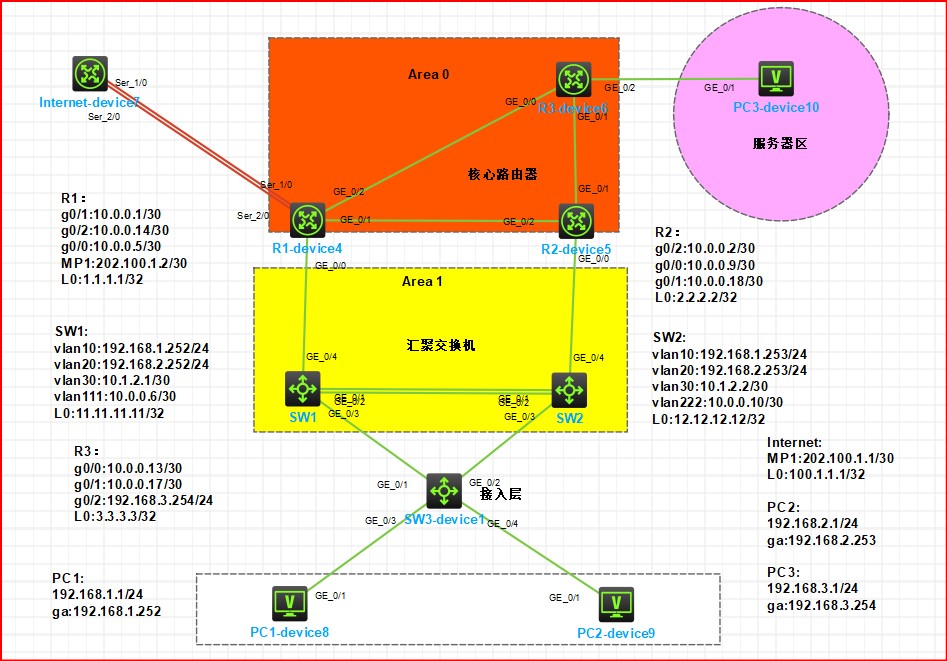
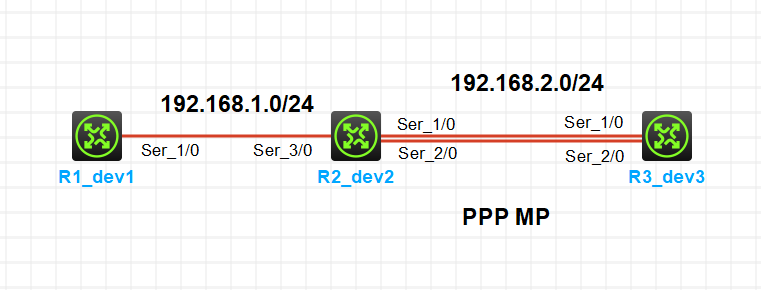
实验拓扑
图1-1
实验需求
1.R1 和 R2 使用 PPP 链路直连,R2 和 R3 把 2 条 PPP 链路捆绑为 PPP MP 直连
2.按照图示配置 IP 地址
3.R2 对 R1 的 PPP 进行单向 chap 验证
4.R2 和 R3 的 PPP 进行双向 chap 验证
实验解法
1.R2 和 R3 上配置 PPP MP
步骤 1:在 R2 上创建 MP-GROUP 口
1 | [R2]int MP-group 1 |
步骤 2:把 S1/0 和 S2/0 加入到上一步创建的 MP-GROUP口
1 | [R2]interface s1/0 |
1 | [R2]interface s2/0 |
步骤 3:R3 上配置命令与 R2 一致,此处省略
2.按照图示配置 IP 地址
分析:如果 PPP 链路上配置了 PPP-MP,那么链路的 IP 地址就必须配置在 MP-GROUP 口上,而不是物理口上
步骤 1:R1 和 R2 的直连链路 IP 地址配置略
1 | [R1]int s 1/0 |
步骤 2:在 R2 和 R3 的 MP-GROUP 口上配置 IP 地址
1 | [R2]interface MP-group 1 |
1 | [R3]interface MP-group 1 |
3.R2 对 R1 的 PPP 进行单向 chap 验证
分析:R2 对 R1 进行单向验证,表示 R2 是主验证方,R1 是被验证方。所以需要在 R2 上创建用于验证的用户
步骤 1:在 R2 上创建用于验证 R1 的用户
1 | [R2]local-user user1 class network |
步骤 2:在 R2 连接 R1 的接口上配置需要进行 PPP 验证,验证方式为 chap
1 | [R2-Serial3/0]ppp authentication-mode chap |
步骤 3:在 R1 连接 R2 的接口上配置用于验证的用户名和密码
1 | [R1-Serial1/0]ppp chap user user1 |
步骤 4:关闭在开启 R1 和 R2 的 PPP 链路,检查验证是否能够通过(步骤略)
1 | [R1-Serial1/0]shutdown |
4.R2 和 R3 的 PPP 进行双向 chap 验证
分析:双向验证意味着 R2 和 R3 双方都需要创建用于验证的用户,且需要在各自接口上配置对端的用户名
另外,虽然R2 和 R3 之间的 PPP 链路配置了 PPP-MP,但是身份验证仍然需要配置在物理接口上,所以 R2 和 R3 相连的所有 PPP 接口上都需要配置验证
步骤 1:在 R2 和 R3上创建用户验证 R3 的用户
1 | [R2]local-user user2 class network |
1 | [R3]local-user user2 class network |
步骤 2:在 R2 和 R3 相连的接口上配置需要进行 PPP 验证,验证方式为 chap,并配置对端验证本端的用户名
1 | [R2-Serial1/0]ppp authentication-mode chap |
1 | [R2-Serial2/0]ppp authentication-mode chap |
1 | [R3-Serial1/0]ppp authentication-mode chap |
1 | [R3-Serial2/0]ppp authentication-mode chap |
步骤 4:关闭在开启 R2 和 R3 的 PPP 链路,检查验证是否能够通过(步骤略)
转载于邓方鸣-在线文档库
转载目的:学习